 Read CV
Redesigning the invite‑to‑campaign flow
8x is a B2B marketplace connecting brands with LinkedIn creators. This is one flow, taken from problem-finding through to a working prototype, using Listen Labs as a reference rather than a template.
My Role
Product Designer (redesign + prototype)
Deliverables
1 redesigned flow & interactive prototype
Domain
B2B Marketplace
Duration
24-hour challenge
Overview
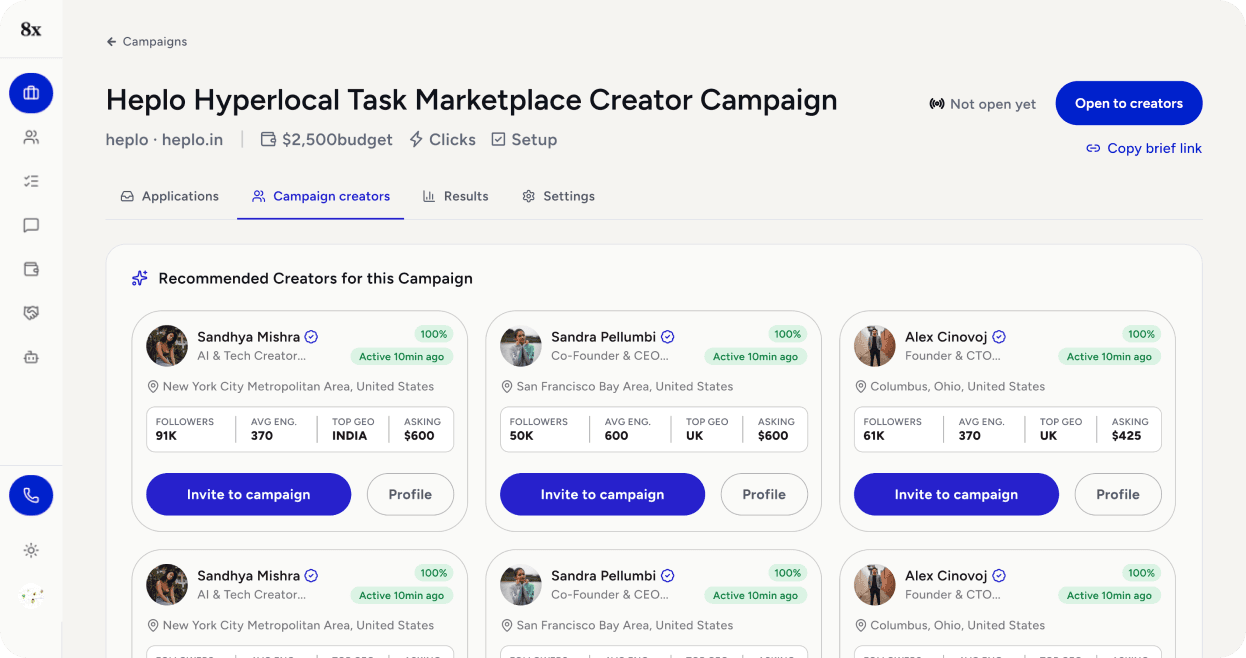
The brief: take 8x.business apart, redesign one flow end-to-end, and defend every decision against a reference product's design language. 8x is a B2B marketplace that connects brands with LinkedIn creators — brands browse a roster of vetted creators, brief them, and track every click and lead a sponsored post generates back to the creator and post that drove it.
The brief was explicit that breadth isn't the goal: "Redesign as much or as little as you can defend. One flow done properly beats every screen done thinly." So rather than reskinning the whole product, I used both 8x and the reference product first, end to end, to understand what each was actually doing before touching either — then picked one flow to take all the way through analysis, redesign, and a working prototype: inviting a creator to a campaign.
That flow is the core transaction 8x exists to support. Everything else in the product — browsing, campaign setup, tracking — exists to lead up to this one moment.
Research — using both products first
Signed up for 8x as a brand and clicked through the real flow: signup, onboarding, campaign setup, the creator grid, inviting a creator, and the profile panel — screenshotting every screen along the way rather than judging it from the marketing site.

What I found
Auto-sent invite message, no review step
Invite-to-campaign flow
A real message goes to a real person before a human sees or edits it — a deliberate speed choice, but the wrong trade-off for outreach that’s building a relationship
Redirect out of the grid on every single invite
Invite-to-campaign flow
The grid’s own layout (6+ cards, identical buttons) implies bulk action, but the product forces one-at-a-time, losing your place each time
“Which one are you?” re-asks a question already answered
Onboarding
The brand-only CTA clicked, plus the Company/Work-email fields just filled in, are two signals already saying “brand” — asked a third time anyway, as three equal options
Button promises a state the product hasn’t reached
Campaign creation
“Create campaign & view matches” implies the campaign is live; the next screen says “Not open yet,” contradicting its own CTA
Recency signal buried, engagement signal buried deeper
Creator profile panel
“Last posted 21d ago” — the most decision-relevant fact — sits in tiny grey text; the strongest signal (who actually engages, by role) is two tabs deep
5 truncated stat columns on one card
Creator card
Followers / Avg Engagement / Top Geo / Top Role / Asking Price crammed into one card, so every label gets abbreviated and cut off (“ASKING R…”)
Screenshots
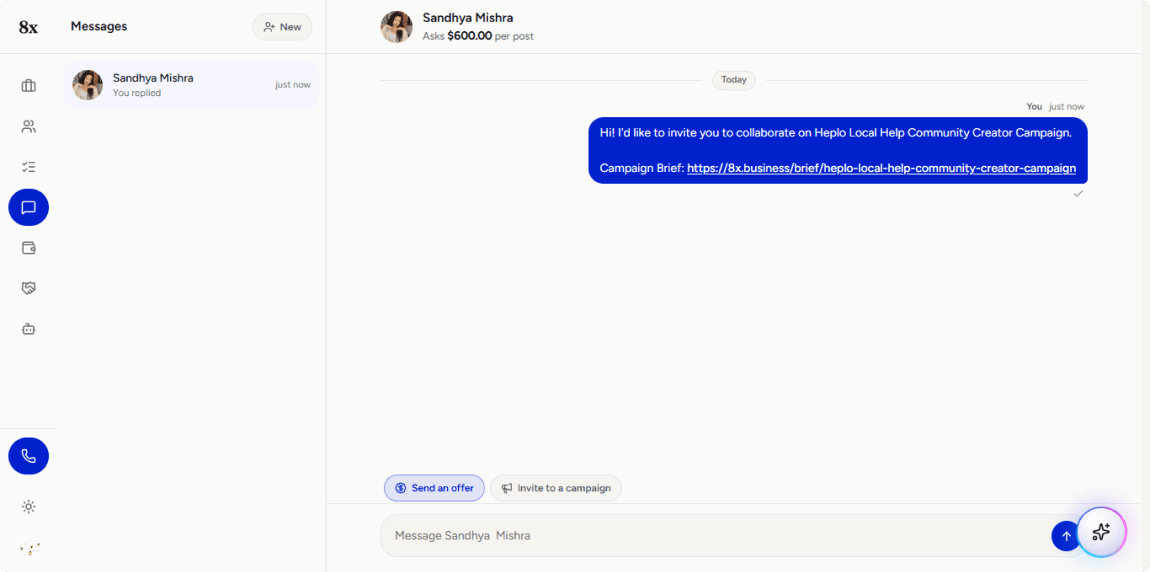
Problem 1: Auto-sent invite message, no review step
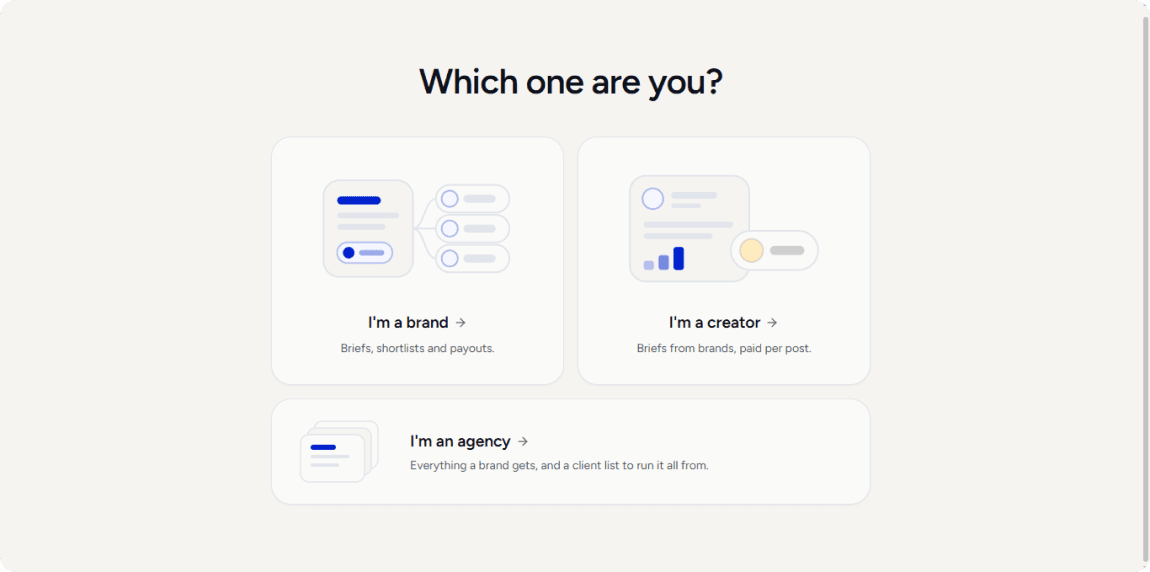
Problem 3: “Which one are you?” re-asks a question already answered
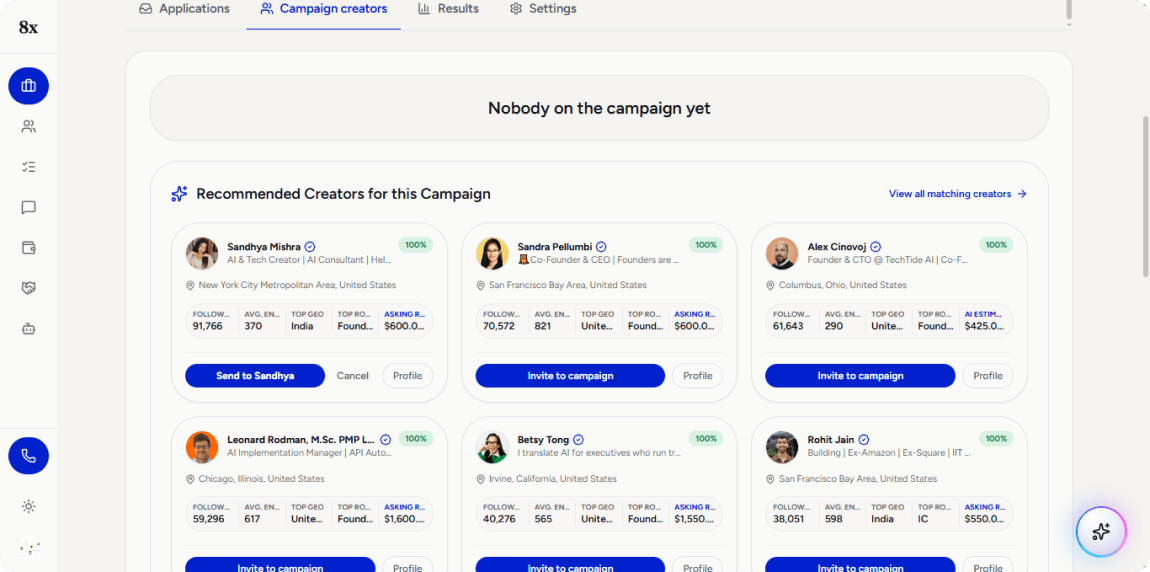
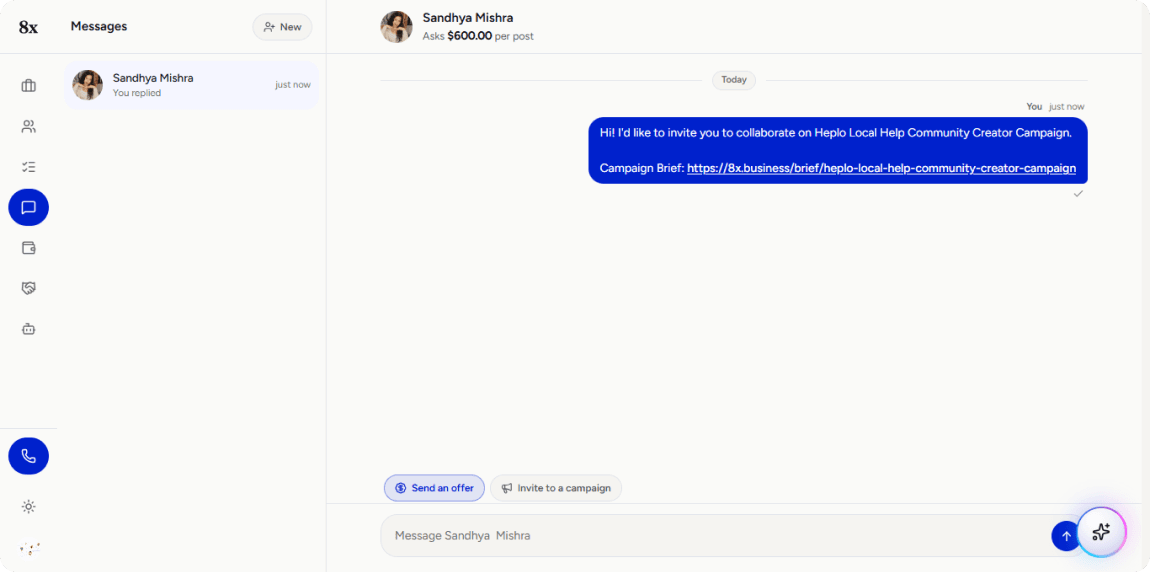
Problem 2: Redirect out of the grid on every single invite
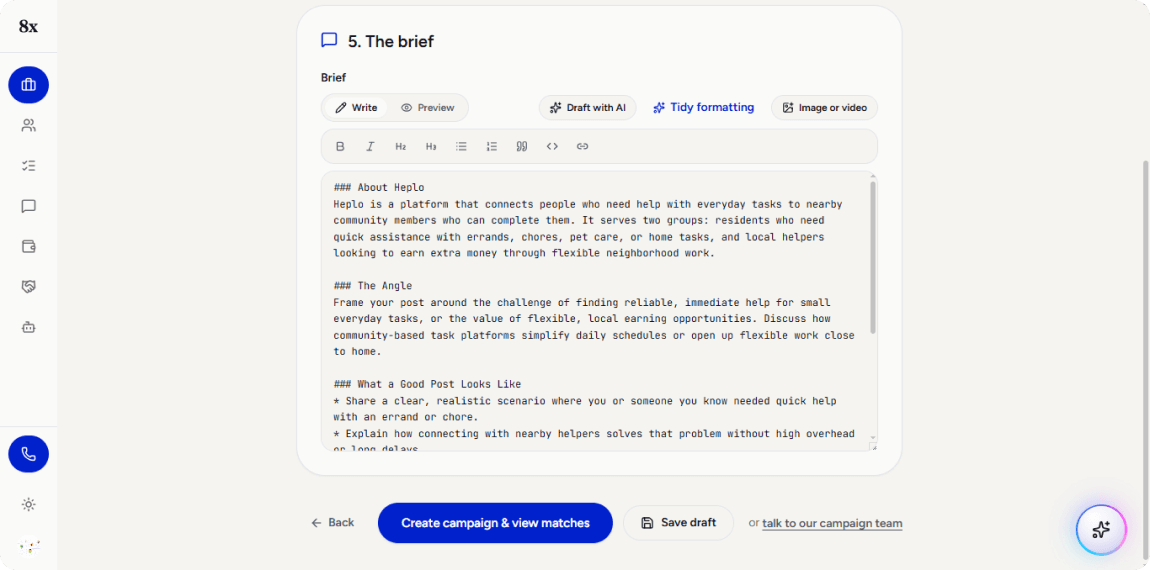
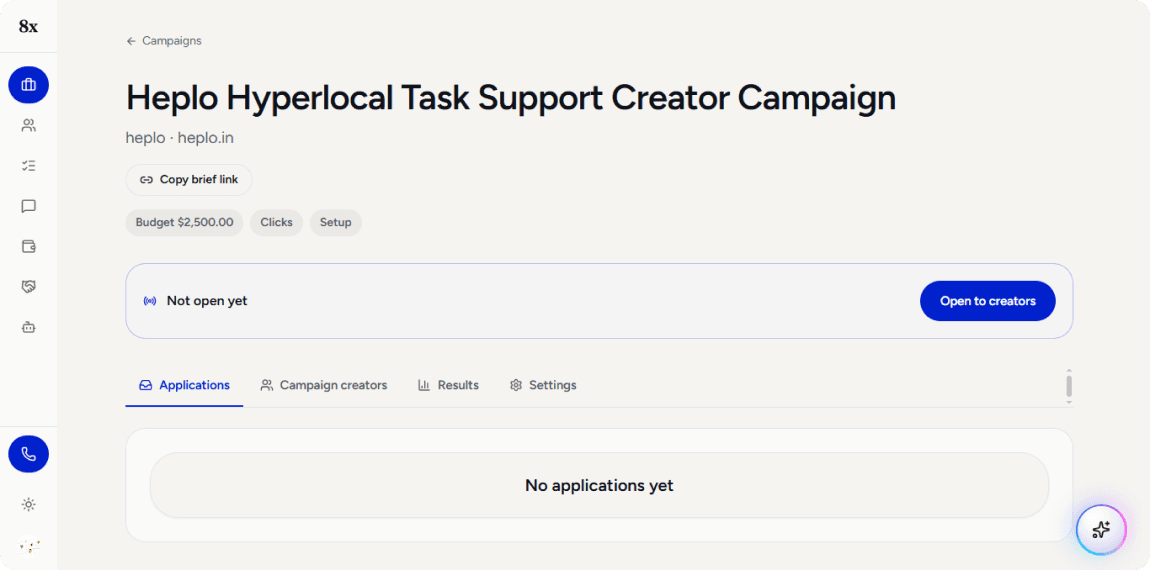
Problem 4: Button promises a state the product hasn’t reached
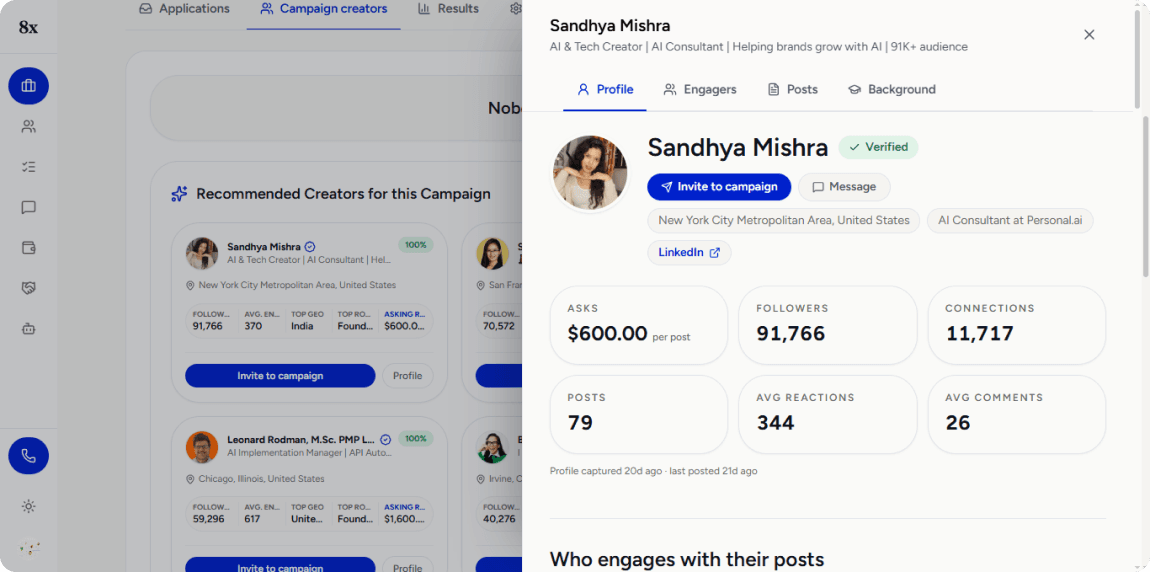
Problem 5: Recency signal buried, engagement signal buried deeper
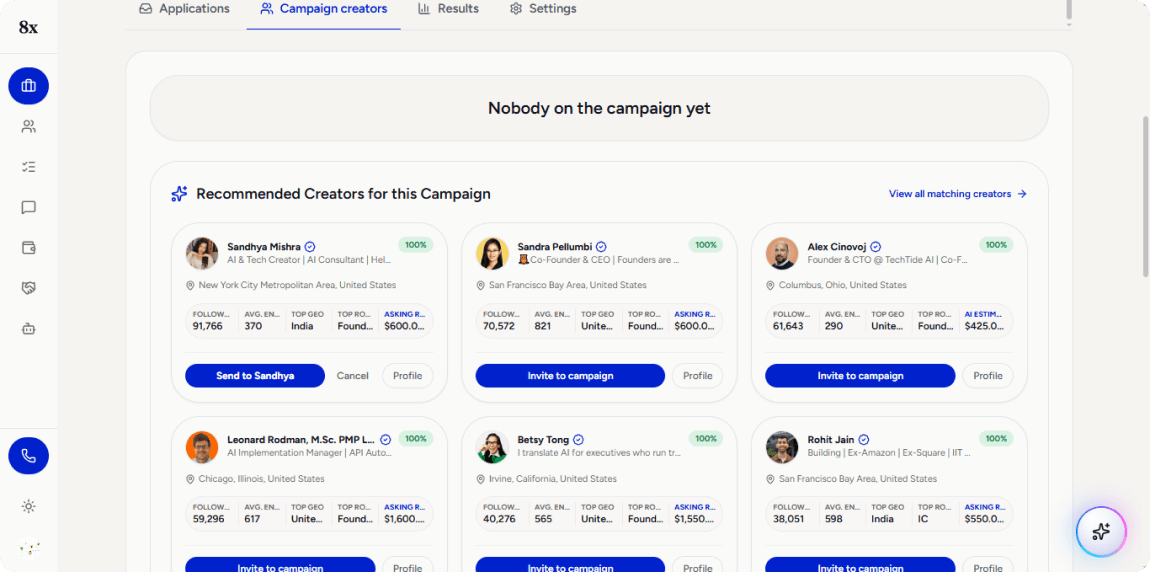
Problem 6: 5 truncated stat columns on one card
Why the invite flow, over the other candidates
I picked the invite flow for three reasons:
- It’s the core transaction, not a supporting screen. Everything else in the product exists to lead up to a brand reaching out to a creator.
- It’s a trust problem, not just a confusion problem. The other candidates cause hesitation or a wrong guess. This one sends a real, unreviewed message to a real person — a different order of consequence.
- It has enough real surface area for a complete before-and-after story — evaluating a creator, committing to reach out, reviewing what gets sent, confirming, and seeing status afterward — without sprawling into every screen in the product.
The redesign
Built as a working HTML/CSS/JS prototype, not static frames — every interaction described below is actually clickable.
https://souvik111.github.io/8x-s-Invite-Creator-s-Flow-Redesign/1. Creator card — cut from 5 stat columns to 4
Followers, Avg. Engagement, Top Geo, and Asking Price stayed, since those directly answer “is this creator worth what they’re asking, and are they where I need them.” Top Role moved into the profile panel, where there’s room to show it properly, rather than as a fifth abbreviated column. The bio line changed from a hard single-line truncation to a 2-line wrap — nothing gets cut off mid-word anymore.
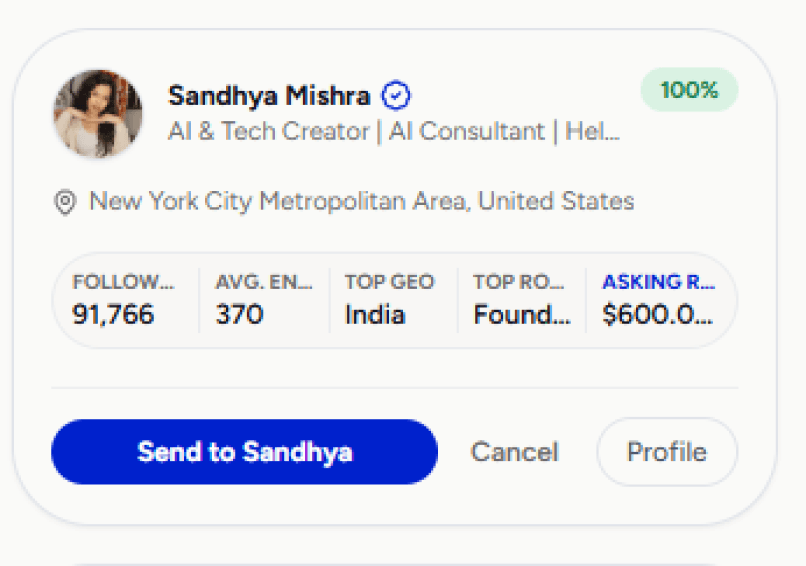
Before
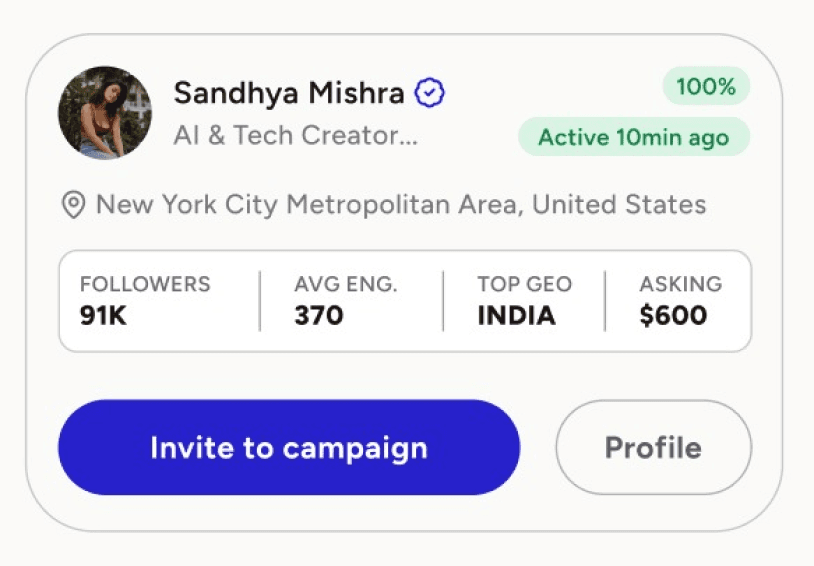
After
2. Recency moved from buried to visible
“Active 3d ago” now sits directly on the card. It was previously the smallest, greyest text at the bottom of the profile panel, despite being more decision-relevant than most of what was already on the card.
3. Multi-select replaces one-at-a-time inviting
A checkbox appears on hover; selecting creators surfaces a persistent bottom bar with a running count and a single “Invite selected” action — matching what the grid’s own layout already implied (many identical cards, same action) but never actually supported.
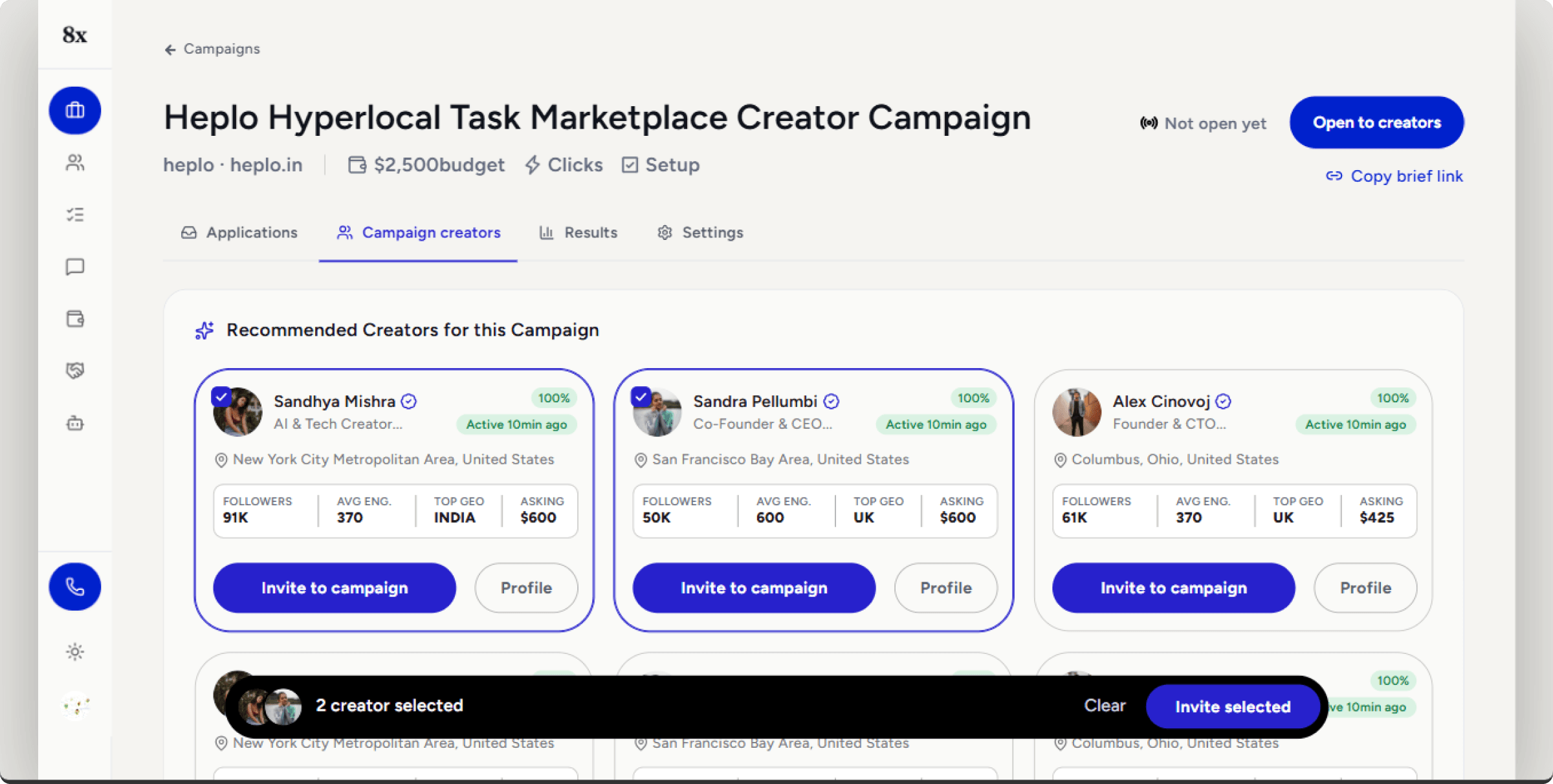
Redesign — Campaign creators, two cards selected, bulk action bar visible
4. A review step, before anything sends
Selecting “Invite” now opens a panel showing exactly who the message is going to, an AI-drafted message that’s fully editable, and the brief link that will be attached. The message still gets drafted instantly — no lost speed — but a human sees it before it reaches a real person, instead of after.
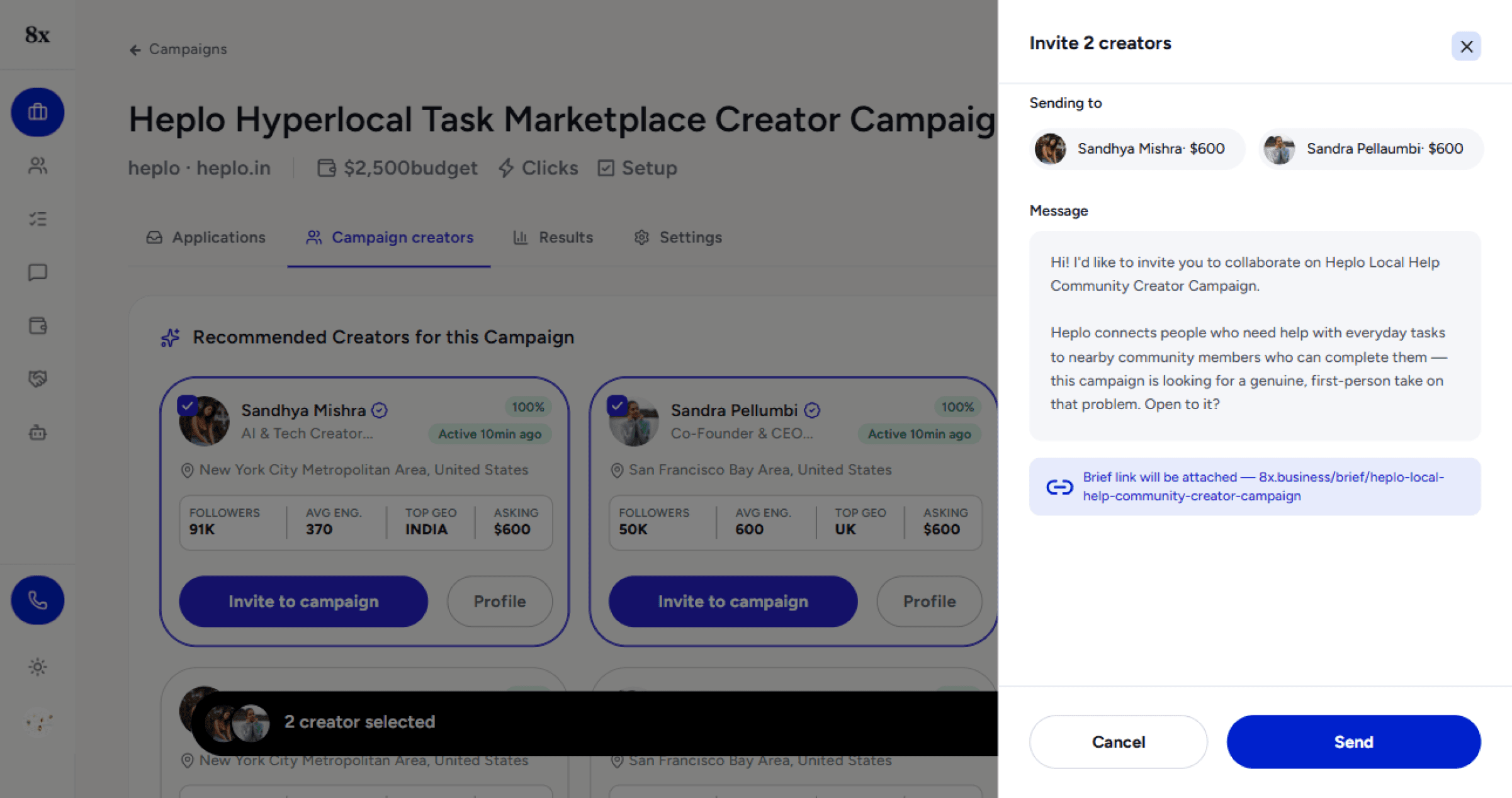
Redesign — Campaign creators, “Invite 2 creators” panel (recipients, editable message, attached brief link)
5. Confirmation without losing your place
Sending shows a toast (“Invite sent to 3 creators”) with a short undo window. Cards update in place to an “Invited” state. No redirect out of the grid — the browse-and-invite loop stays a loop.
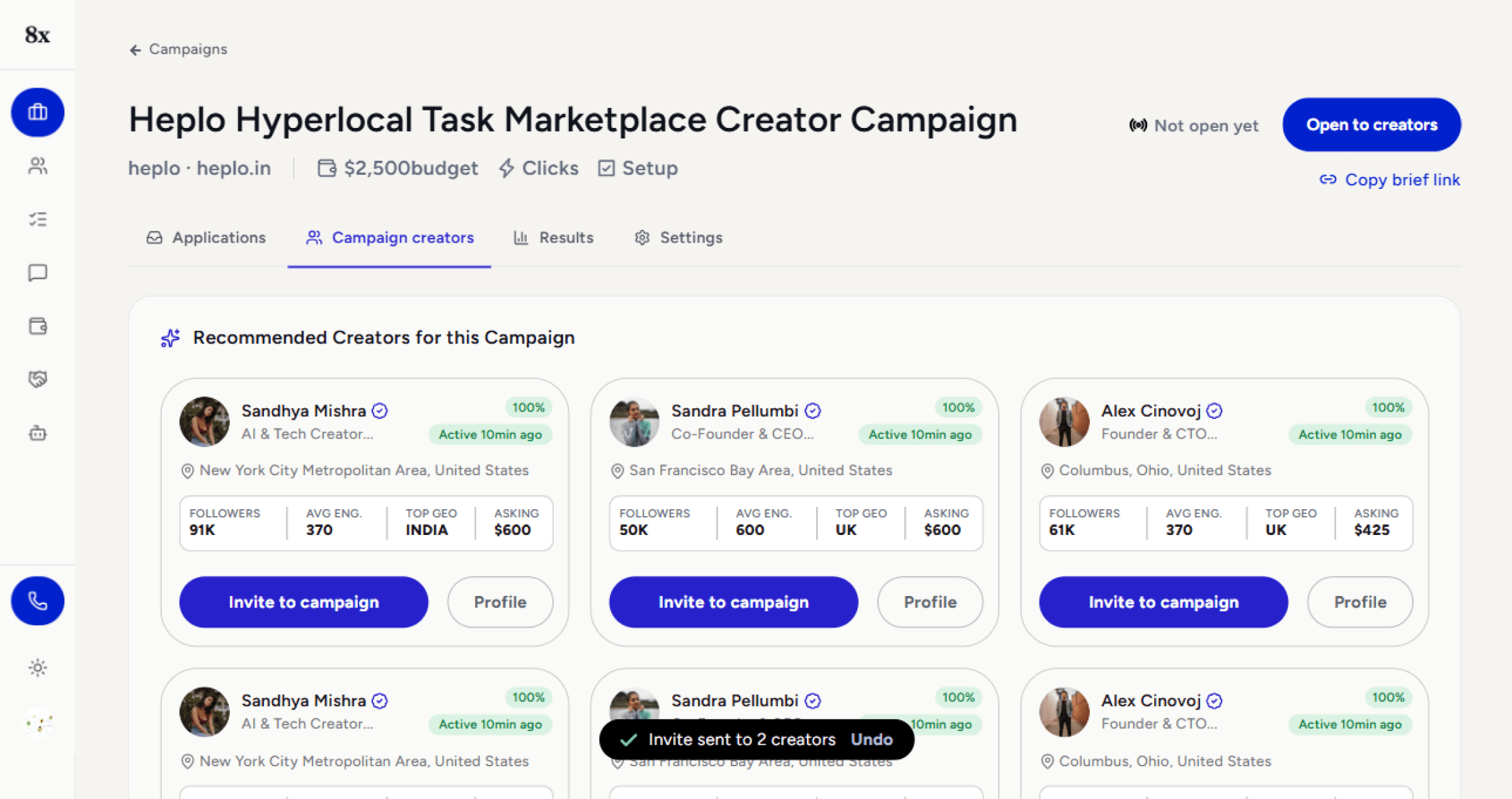
Redesign — Campaign creators, toast confirmation with Undo; invited cards update in place, no redirect
6. Campaign header condensed
The original stacked breadcrumb, title, subtitle, a standalone “Copy brief link” button, three pill-buttons (Budget/Clicks/Setup — two of which weren’t actually clickable despite looking like buttons), and a separate bordered status box: six visual blocks before any real content. Redesigned to two rows — title and live status share a row; brand, budget, click count, setup progress, and the copy-link action collapse into one quiet meta line below it, with icons and values instead of button-styled pills for facts that aren’t actions.
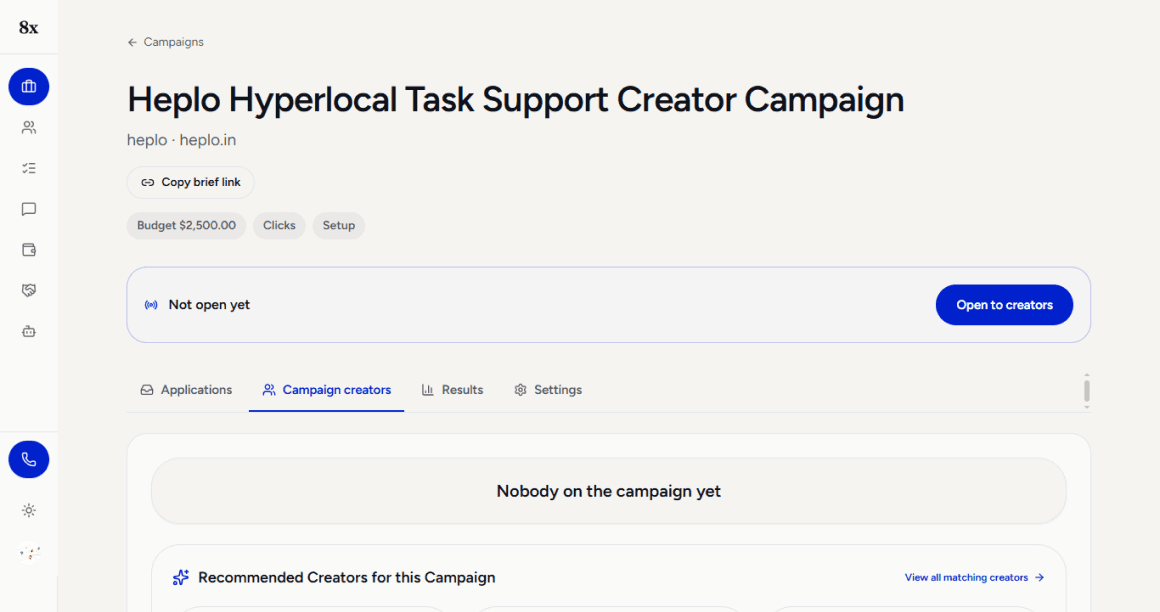
Before
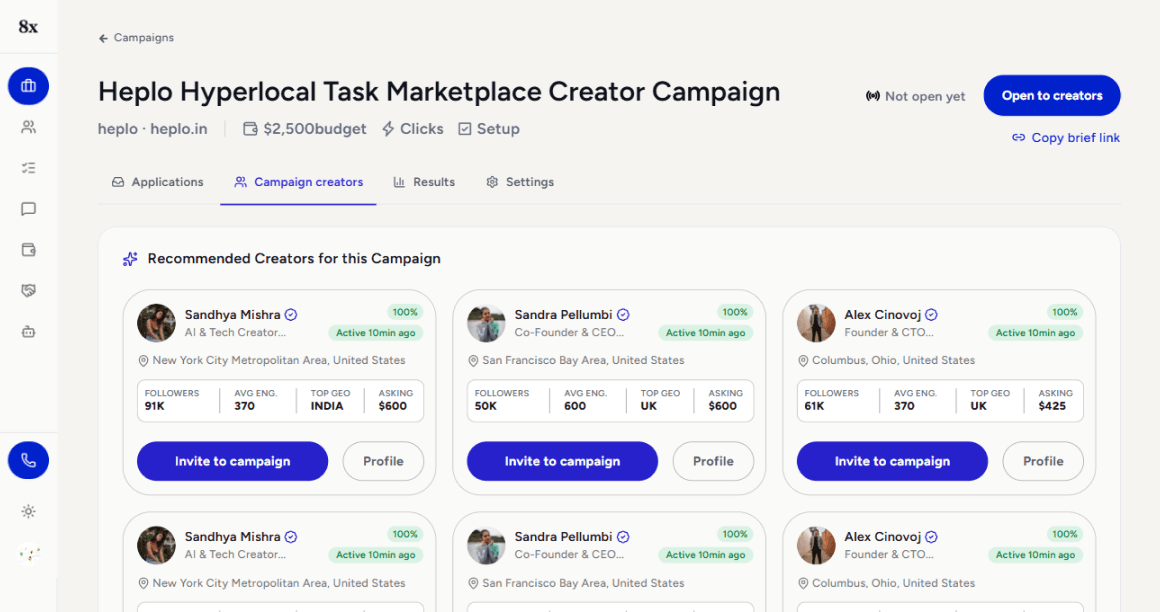
After
Reflection
The main trade-off in the redesign is explicit: the review-before-send panel adds one click to what used to be instant. That's a deliberate cost — an unreviewed message to a real person carries more risk than one extra click is worth avoiding.
With more time, the next thing I'd go after is the brief editor — applying the same "show the real thing, not raw formatting" principle that shaped the rest of this redesign.
ut the brief asked for one flow done properly over five done thinly, so that stayed a noted next step rather than a fourth thing attempted this pass.

Two creators selected. The message is already drafted, sitting right there, before it goes to a single real person. Edit a line, hit send, and the toast confirms it — no redirect, no wondering what just went out. That's the whole brief, solved.
